Windows private beta · local-first
Free up RAM
without losing
your workspace context.
ContextSleep captures the context that matters, safely closes the supported parts of your workspace, then rebuilds them later and checks what actually came back.
- Capture first
- Review before close
- Verified restore
- Stays on your PC
Unsigned private beta for Windows 10 and 11. No installer or auto-updater yet.
hibernate
Active workspace
- VS VS Codehibernate · 14 editors Open
- Ch Chrome21 tabs · 3 groups · 2 pinned Open
- Fo ExplorerD:\projects\hibernate Open
System memory available
5.4 GB
Windows reports 5.4 GB of 15.8 GB available.
A workspace you are done with for now: an editor, a browser window and a folder.
Illustration of the ContextSleep lifecycle. The figures are an example, not a promise.
Verified sleep and restore today for VS Code, Chrome and approved local Node or Python services. Explorer folders and instrumented terminals restore as context. Broader app coverage is planned.
GPT-6 Astra Challenge
Astra helped solve the hard systems problems, not just write copy.
GPT-6 Astra was used throughout ContextSleep's engineering: reasoning about native Windows ownership, fail-closed close rules, durable checkpoints, cold-start recovery, service verification, and ambiguous multi-window VS Code cases.
Astra was an engineering collaborator during the build. ContextSleep itself remains local-first and does not require a cloud AI runtime to sleep or restore a workspace.
Full Chrome + VS Code walkthroughConnect → Save → Review → Sleep → Restore → Verified
The difference
Reopening apps is not the same
as getting your workspace back.
Anything can relaunch a program. The hard part is knowing what was there, closing only what is safe to close, and proving afterwards that it really came back.
Just relaunching apps
- Opens the program and hopes the session restores.
- Closes whatever matches a window title.
- No record of what was actually saved.
- No check that anything came back.
ContextSleep
- Saves reconstructable context before anything closes.
- Shows you the exact close plan and rechecks it at the last moment.
- Leaves anything ambiguous open rather than guessing.
- Reports what it observed coming back, capability by capability.
How it works
Capture first. Close safely.
Restore with evidence.
-
01
Capture
ContextSleep saves your browser organization, VS Code workspace and editor context, selected folders and terminal working directories, and any service you approved, into one durable local checkpoint.
Nothing closes at this step.
-
02
Review
You see the exact close plan: what is safe to sleep, what will be kept open, and what cannot be reconstructed. Unsaved work, running tasks and ambiguous window ownership all block automatic close.
You choose every window that may close.
-
03
Sleep
Each approved window is rechecked immediately before it closes, then ContextSleep confirms it actually disappeared. A close it cannot verify stops the rest of the sequence instead of continuing.
Memory is released by the apps that closed.
-
04
Restore and verify
Chrome relaunches into the profile you enrolled, VS Code reopens the saved workspace and waits for the same integration identity, and approved services restart only after you review their exact command.
READY is only shown when every selected capability was observed.
The memory question
We report the reading,
not a marketing number.
ContextSleep records what Windows reports before and after each sleep. On Windows, memory is shared between processes, so no tool can honestly claim an exact figure that belongs to one workspace alone. ContextSleep shows the system observation and says exactly what it means.
- What you get: the signed change in system available memory across the operation.
- What you also get: working-set and private-commit readings for the processes involved.
- What we never say: “ContextSleep saved you exactly X GB.”
System available memory
+1.90 GB
before5.40 GB
after7.30 GB
Safe by design
If ContextSleep cannot safely identify
what to close, it leaves it open.
Every destructive step is gated by something ContextSleep actually observed. There is no window-title matching, no focus guessing, no timing heuristic, and no force-termination of your applications or services.
Safe to sleep
Needs review
Kept open
Restore verified
Ready
Capture is separate from closing
A window can only be closed after its context has been saved and you have reviewed it. There is no single button that captures and closes in one motion.
Rechecked at the last moment
Approval is single use. Between your approval and the close, ContextSleep checks the target again; anything that changed cancels the run.
Failure stops the sequence
If one close cannot be verified, later closes do not happen. Interrupted work is never replayed automatically after a restart.
Fail closed, always
Unsupported and ambiguous targets stay open and stay visible, even though that means the workspace keeps using memory.
A real example
Two VS Code windows, one process
Two VS Code workbenches can share a single GUI process. There is no supported Windows primitive that maps the integration instance to the exact workbench window, so ContextSleep cannot prove which window belongs to the workspace. It refuses to close either one and tells you why — instead of relying on titles, focus order or timing.
The end of the loop
It checks what
actually came back.
ContextSleep does not just reopen your apps. After a restore, every capability you selected is verified against what the applications report, and READY is a conclusion drawn from that evidence rather than a progress bar that finished.
Workspace restored
Ready- Chrome tabs and groups21 of 21
- Chrome window organizationverified
- VS Code workspace identityverified
- Frontend service healthverified
The app
See exactly where
your workspace is.
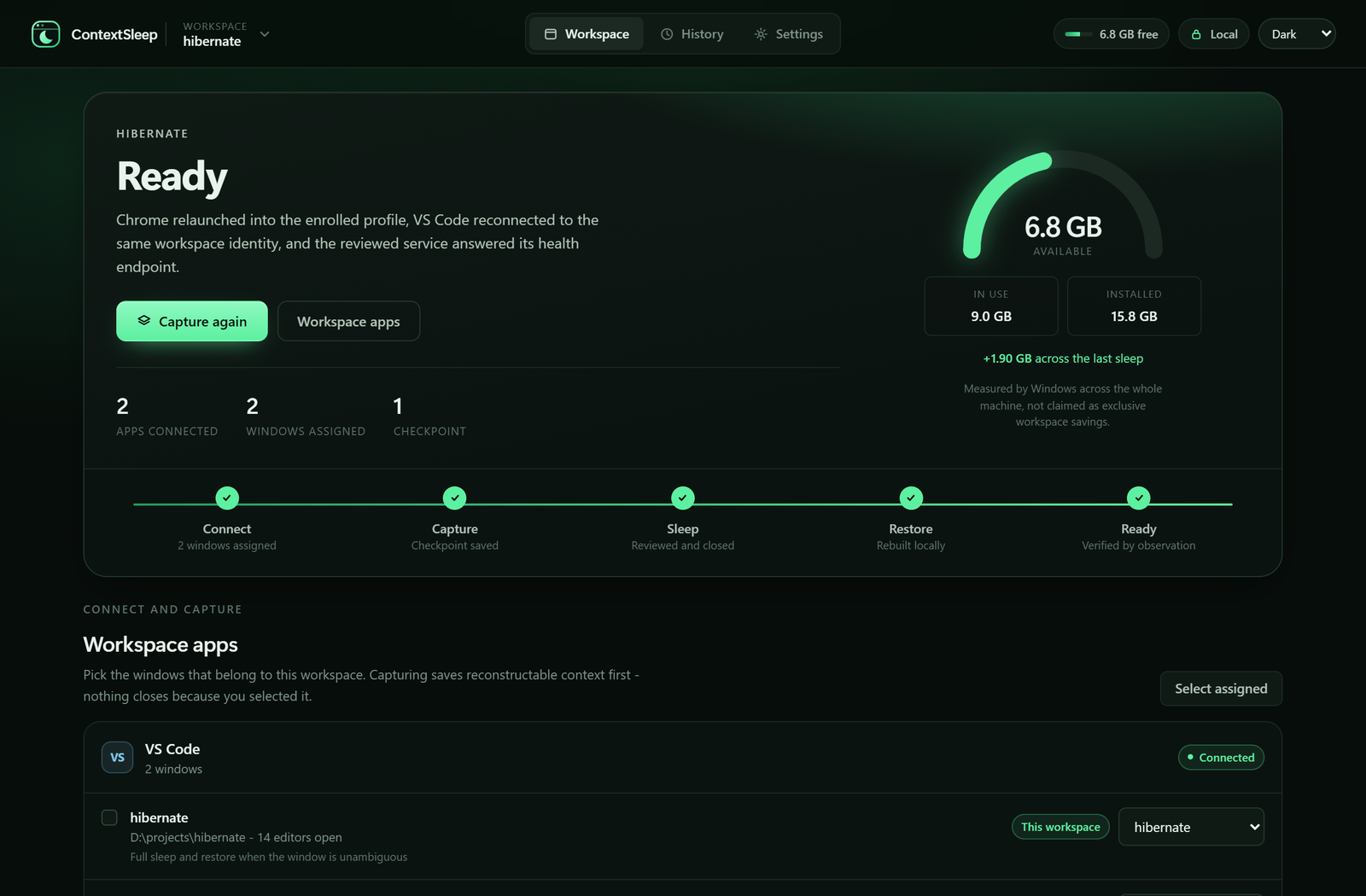
Local-first
Your workspace stays local.
There is no account, no cloud sync and no telemetry. Captures and checkpoints live in your local application data, and their semantic payloads and exported backups are encrypted for your Windows account.
- No accountNothing to sign up for, nothing to sign in to.
- No cloudCaptures never leave the machine that made them.
- No telemetryThe support report holds capability and status counts only — never paths, URLs, titles or commands.
- Your keysBackups are protected to the Windows account that exported them.
Coverage
What ContextSleep supports today.
The beta starts where the guarantees can be proven. The goal is ordinary desktop workspaces too, not only developer ones — but an app only appears here once its sleep and restore behaviour is verified end to end.
VS Code
Saved local workspace and editor context, reviewed native close when the window is unambiguous, and cold restore back to the same integration identity.
Chrome
Profile-bound capture and cold restore with tab, order, pin and group verification. Quick Sleep can discard eligible background tabs without closing the window.
Local dev services
Direct Node or Python services you reviewed explicitly, with observed ownership, graceful stop and checkpoint-driven restart.
Explorer and terminals
Folders and verified instrumented prompt directories reopen as context. ContextSleep never closes an Explorer window and never replays terminal history, panes or commands.
Where this is going. The lifecycle is deliberately app-agnostic: capture, review, close, restore, verify. Broader desktop coverage is the plan, and each new application ships only when its restore can be verified the same way.
Current limits
Fail closed beats pretending.
This is a private beta and it is written down honestly.
- Windows 10 and 11 only.
- Actual recovery across a Windows reboot has not been validated and is not claimed.
- Two VS Code workbench windows sharing one GUI process block automatic close.
- Explorer windows and arbitrary terminals are context restore, never automatic close.
- The build is unsigned and ships as a portable beta rather than a polished installer.
- Supported apps are discovered automatically. VS Code's adapter installs itself; Chrome still requires one browser-approved Load unpacked step in this private beta.
Built with GPT‑6 Astra
Astra worked on the parts of this product where guessing would be dangerous: Windows process and window ownership, durable close verification, cold-start recovery, service lifecycle design and the safety boundaries above. Where it could not find a trustworthy primitive, the answer was to block the action rather than approximate it.
ContextSleep 0.1.0 · private beta
Close the workspace.
Not the context.
Try it on Windows and tell me which apps and workspace types ContextSleep should cover next.
Portable folder, no installer. Verify the included SHA256SUMS.json after unzipping.